D3 provides powerful functions for manipulating raw data sets, including csv(), nest(), and rollup().
I generated a hundred rows of test_data.csv using generatedata.com:
Colors,X,Y,Quantity
violet,1,8,91
blue,9,1,32
blue,3,1,67
yellow,5,5,63
violet,6,6,57
green,5,10,65
red,8,2,36
...
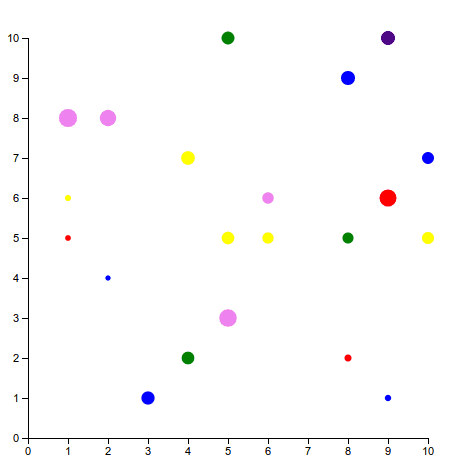
The basic properties are a Color (one of blue, yellow, violet, green, and red), an X-value (between 1 and 10), a Y-value (also between 1 and 10), and a Quantity value (between 1 and 100).
csv()
You can import a raw, comma-delimited data file, and bind the data directly to an svg.
d3.csv("test_data.csv", function(csv) {

  svg.selectAll("circle").data(csv).enter()
    .append("circle")
    .attr("cx",getX)
    .attr("cy",getY)
    .attr("r", getR)
    .style("fill", getColor);
})
nest() and rollup()
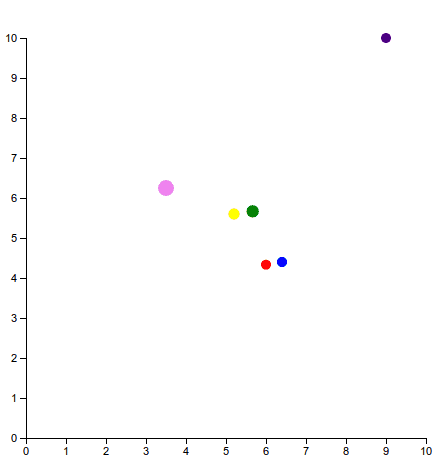
You can also aggregate data on any property — just tell D3 which one, and use any of D3’s handy utility functions (mean, median, sum, min/max, quantile, etc) to return the aggregate data you want to display. For example, I want to plot the average data for each color. I tell my D3 selection to nest the data on the color key. Then I tell the rollup function to take the average for each property of the data. Pass the new data to the svg instead of the csv, and voila
d3.csv("test_data.csv",function(csv) {
  data = d3.nest()
          .key(function(d) { return d.Colors; })
          .rollup( function(d) {
            return {
              "X": d3.mean(d, function(e) { return +e.X; }),
              "Y": d3.mean(d, function(e) { return +e.Y; }),
              "Quantity": d3.mean(d, function(e) { return +e.Quantity; })
            };
          })
          .entries(csv);

  svg.selectAll("circle").data(data).enter()
    .append("circle")
    .attr("cx",getX)
    .attr("cy",getY)
    .attr("r", getR)
    .style("fill", getColor);

})
D3 is so awesome.