Many beginner Angular tutorials start with a set of canned data, an input field, and a search filter, so it was a natural place to start on my side project, Virtual Playbill. With even a small data set, watching the DOM change based on search criteria was a thrilling achievement. In the intervening months, as features were added, rebuilt, or taken away, I had inadvertently broken the search box. The tutorials were still available, and still fairly basic, but I couldn’t get it to work. Not until I found a couple of invaluable tools for troubleshooting overlapping scopes:
1. Use the developer tools console
This handy trick will give you a console object corresponding to that element’s scope:
- select a DOM element in using the chrome developer tools
- enter
angular.element($0).scope()into the console pane ($0is a global variable holding a reference to the selected DOM element)
// with the search box selected
> angular.element($0).scope()

$get.h.$new.a.$$ChildScope.$$ChildScope {$$childTail: null, $$childHead: null, $$nextSibling: $get.h.$new.a.$$ChildScope.$$ChildScope,
  ...
  $parent: h
  playbillRows: Array[23]
  playbills: Array[68]
  search: Object
    title: "this is search text"

// with the playbill area selected
> angular.element($0).scope()

$get.h.$new.a.$$ChildScope.$$ChildScope { $$childTail: $get.h.$new.a.$$ChildScope.$$ChildScope, $$childHead: $get.h.$new.a.$$ChildScope.$$ChildScope, $$nextSibling: null,
  ...
  $parent: h
  playbillRows: Array[23]
  playbills: Array[68]
Things are definitely looking different between the scope containing my search box and the scope where I am laying out the view: the second scope appears to be a sibling of the first. I needed something a little more visual before it completely sunk in, though.
2. Use ng-inspector
ng-inpector is a browser extension that allows you to navigate your angular app as if it were a file directory:
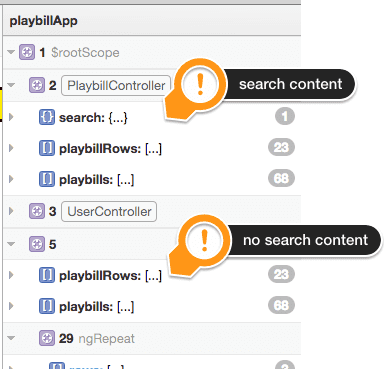
I can see at a glance that the scope containing the search box (#2), is separate from the scope where I am laying out my view (the unnamed scope #5).
Because of these tools, I have learned that multiple instances of the same controller do not share scope. Using ng-router, I declared the controller for the view:
  ...
  when('/', {
    templateUrl: 'views/index.html',
    controller: 'PlaybillController'
  });
  ...
In my layout, I had declared the controller once more:
  ...
  <div ng-controller="PlaybillController">
    <form class="navbar-form navbar-left" role="search">
      <div class="form-group">
        <input type="text" class="form-control" placeholder="Search shows" ng-model="search.title">
      </div>
    </form>
  </div>
  ...
The search box was already in the context of a Playbill Controller, and I had inadvertently put in another. The solution was to simply remove the second ng-controller:
  ...
  <div>
    <form class="navbar-form navbar-left" role="search">
      <div class="form-group">
        <input type="text" class="form-control" placeholder="Search shows" ng-model="search.title">
      </div>
    </form>
  </div>
  ...
I have been growing my Ruby/Rails troubleshooting toolbox for a while now, and it is good to get one started for angular as well.