Tell Gatsby about your new content
Using the gatsby-source-filesystem plugin, identify your new collection of content and give it a reference name.
Add this to the plugins section of your gatsby-config.js:
  plugins: [
    {
      resolve: `gatsby-source-filesystem`,
      options: {
        path: `${__dirname}/content/cheatsheets`,
        name: `cheatsheets`,
    },
Tell Gatsby to add some node meta-data
When Gatsby is creating nodes out of your markdown files, tell it to detect what collection it is a part of and add that information to the node metadata:
Add this to your gatsby-node.js onCreateNode method:
exports.onCreateNode = ({ node, actions, getNode }) => {
  const { createNodeField } = actions

  if (node.internal.type === `MarkdownRemark`) {
    const collection = getNode(node.parent).sourceInstanceName

    createNodeField({
      name: 'collection',
      node,
      value: collection
    })
...
  }
}
With those two pieces in place, you can group your content by the collection they appear in:
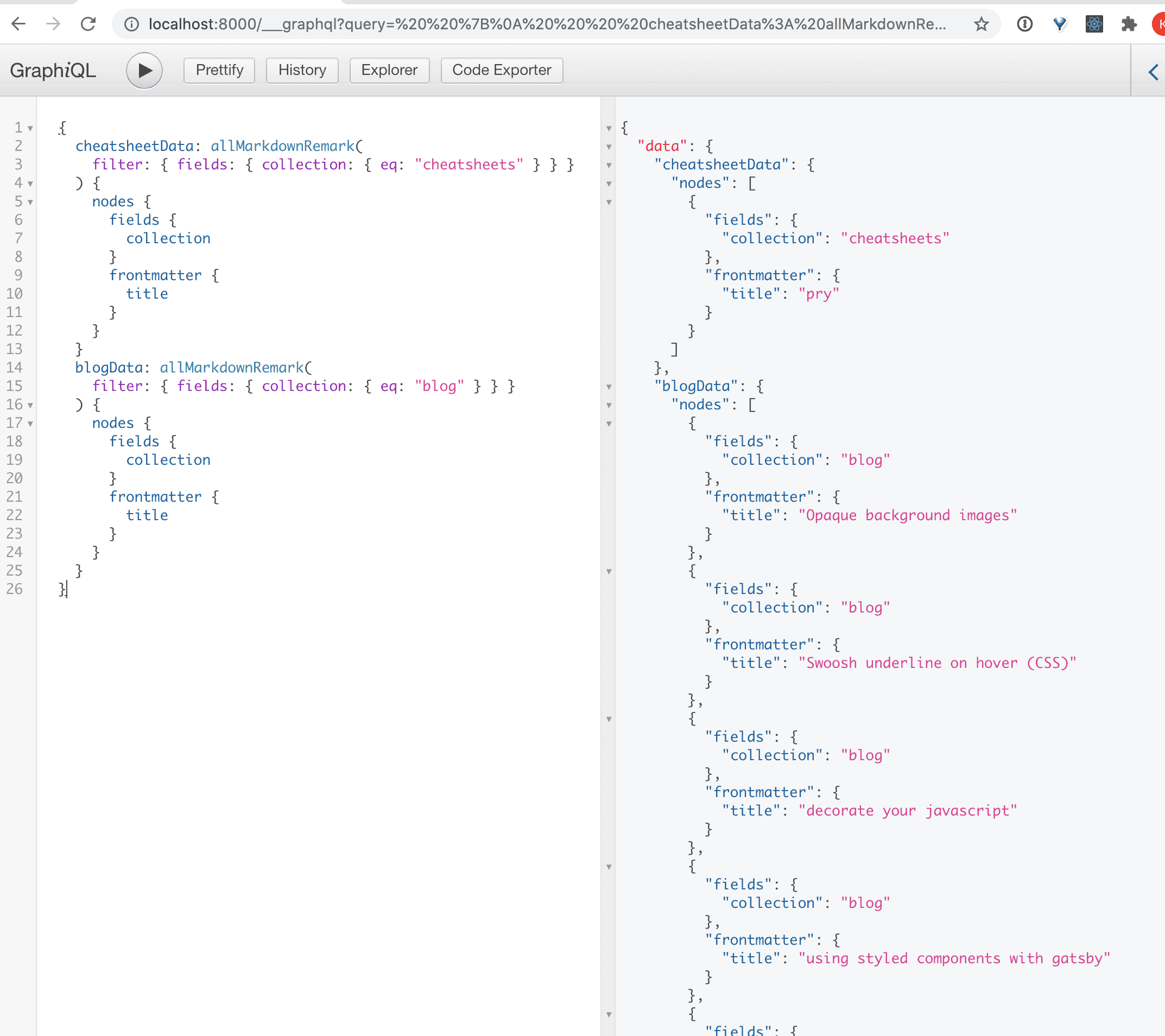
If you are using the gatsby blog template like I am, you can fix some of those console errors by adding the new collection field to your schema:
In your gatsby-node.js file:
exports.createSchemaCustomization = ({ actions }) => {
  const { createTypes } = actions

  createTypes(`
...
    type MarkdownRemark implements Node {
      frontmatter: Frontmatter
      fields: Fields
    }
...
    type Fields {
      slug: String
      collection: String
    }
  `)
}
Update createPages to generate your collections
Start with a config object that describes each collection:
const COLLECTIONS = [
  {
    name: "blog",
    hasDetailPage: true,
    needsPagination: true,
    indexComponent: path.resolve("./src/templates/blog-list.js"),
    detailComponent: path.resolve(`./src/templates/blog-post.js`),
  },
  {
    name: "cheatsheets",
    hasDetailPage: true,
    indexComponent: path.resolve("./src/templates/cheatsheet-list.js"),
    detailComponent: path.resolve(`./src/templates/blog-post.js`),
  },
]
In order to build your collection pages, you need a generic function that will work for each of your collections. In my case, I wanted a collection of blog posts (a paginated index page and post page for each blog), and a collection of cheatsheets (a non-paginated index page and post page for each cheatsheet).
const buildCollectionPages = ({
  nodes,
  createPage,
  name,
  needsPagination,
  hasDetailPage,
  indexComponent,
  detailComponent,
}) => {
  const posts = filterNodes(name)(nodes)

  if (needsPagination) {
    // Paginated index pages
    const numPages = Math.ceil(posts.length / MAX_POSTS_PER_PAGE)
    Array.from({ length: numPages }).forEach((_, i) => {
      const currentPage = i + 1
      const previous = i === numPages - 1 ? null : currentPage + 1
      const next = i === 0 ? null : i

      createPage({
        path: i === 0 ? `/${name}` : `/${name}/page_${currentPage}`,
        component: indexComponent,
        context: {
          limit: MAX_POSTS_PER_PAGE,
          skip: i * MAX_POSTS_PER_PAGE,
          numPages,
          currentPage,
          next,
          previous,
        },
      })
    })
  } else {
    // Single index page
    createPage({
      path: `/${name}`,
      component: indexComponent,
    })
  }

  // Generate detail pages for each post in the collection
  if (hasDetailPage) {
    posts.forEach((post, index) => {
      const previous = index === posts.length - 1 ? null : posts[index + 1]
      const next = index === 0 ? null : posts[index - 1]
      const { slug } = post.fields

      createPage({
        component: detailComponent,
        path: slug,
        context: {
          slug,
          previous,
          next,
        },
      })
    })
  }
}
Query for all your data, ensuring that you fetch the collection field as well. Loop over your COLLECTIONS, and build the pages for each one by passing in the retrieved data:
const createCollectionPages = async function ({ graphql, actions, reporter }) {
  const { createPage } = actions

  const result = await graphql(`
    query {
      postData: allMarkdownRemark(
        sort: { fields: [frontmatter___date], order: DESC }
      ) {
        nodes {
          fields {
            collection
            slug
          }
          frontmatter {
            title
          }
        }
      }
    }
  `)

  COLLECTIONS.forEach(collection => {
    buildCollectionPages({
      ...collection,
      nodes: result.data.postData.nodes,
      createPage,
    })
  })
}

module.exports = createCollectionPages
The { graphql, actions, reporter } object is passed in to the createPages API from Gatsby. We call createCollectionPages in an async context in gatsby-node.js createPages
const createCollectionPages = require('./gatsby-helpers/create-collection-pages')

exports.createPages = async ({ graphql, actions, reporter }) => {
  await createCollectionPages({ graphql, actions, reporter })
}
If you aren’t generating any other types of pages, you can make it even more succinct:
exports.createPages = createCollectionPagesAwesome.